How to test Firebase App Check locally with Debug Tokens
I absolutely love Firebase App Check for securing Firebase functions, if you follow any security influencers lot of times you will hear them talk about “onion”, not the vegetable but layered approach to security. This is exactly what Firebase App Check is. It’s another layer that helps to protect your applications by ensuring only your application, whether its a web app or a mobile app can be source of requests to Firebase Functions.
By far one of the most annoying things you encounter with added security layers is added complexity of testing. The idea of this post is to be super short, straight to the point and help you get past the initial struggle of testing your app check protected functions using curl.
Prerequisites:
-
you will need existing Firebase project
-
application provisioned in your Firebase project (I’ll be using Web)
-
Firebase function deployed that enforces App Check
Firebase (Portal) setup
First thing first, you will need to register your application with app check if you haven’t already:
-
Navigate to Firebase -> App Check (this might be hidden under
Securitymenu) -
Navigate to Apps tab and click
Registernext to your application -
You will be asked to provide recaptcha secret, for the sake of debug token use, you can enter a dummy value.
While you may enter a dummy value since you are bypassing the actual reCAPTCHA validation that’s part of App Check, it’s always safer to provide actual secret to not forget it later!
-
Once your app has been registered, select the 3 dots menu ->
Manage debug tokens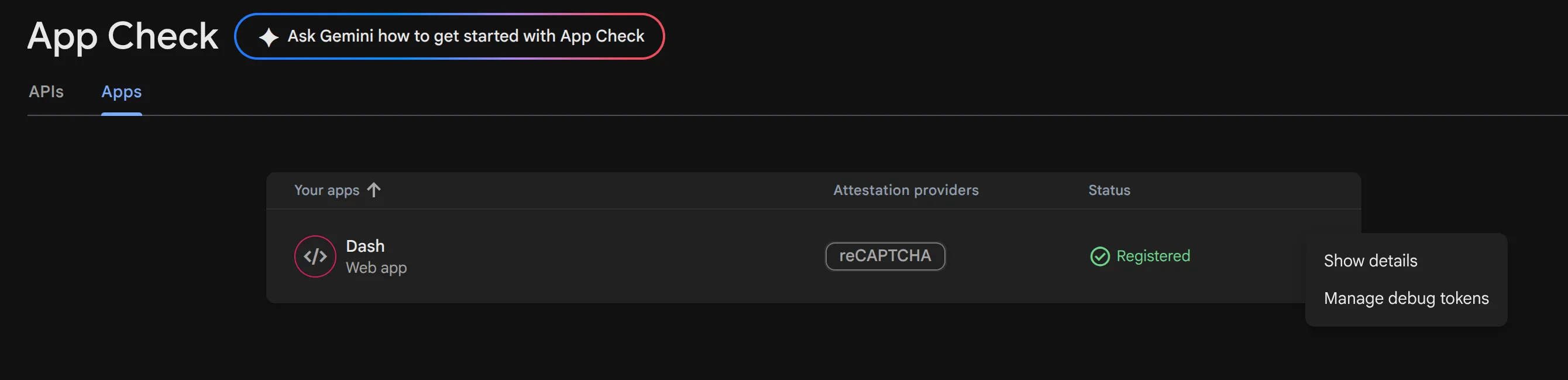
-
Click
Add debug token, give it a name and generate a token. Save the value.
Terminal setup
While you now have your debug token, it cannot directly be used with the X-Firebase-App-Check header, but instead it has to be exchanged for a JWT.
To exchange your token, you will need the following information from your registration, you can get this from Project Settings -> Your Applications:
- appId: “1:PROJECT_ID:web:f00000000000000000”
-
projectId: this can be found in the appId itself, see bold part
-
debug token: the one from earlier step
Fill out the following request and send it:
curl -X POST "https://firebaseappcheck.googleapis.com/v1/projects/<YOUR_PROJECT_ID>/apps/<YOUR_APP_ID>:exchangeDebugToken?key=<YOUR_WEB_API_KEY>" \
  -H "Content-Type: application/json" \
  -d '{
    "debugToken": "<YOUR_DEBUG_TOKEN>"
  }'
This should respond with your JWT token with 3600s expiration.
{
  "ttl": "3600s",
  "token": "<COPY_THIS_VALUE>"
}
Now with the token from the response you can start sending test requests to your app check protected Firebase Function!
curl -X POST https://us-central1-agent-123.cloudfunctions.net/repo-helper \
  -H "Content-Type: application/json" \
  -H "X-Firebase-App-Check: <YOUR_JWT_TOKEN>" \
  -d '{
    "query": "What does the github tool do?",
    "user_id": "martin-test",
    "session_id": "test-session-1"
  }'
{"response":"Hello! I am **RepoHelper**, your expert developer assistant. \n\nI am ready to help you with:\n1. **Navigating and analyzing codebases:** I can read, list, and analyze files from GitHub repositories to answer specific questions about code structures, logic, or APIs.\n2. **General programming concepts:** I can explain algorithms, design patterns, language syntax, framework usage, and more.\n3. **Troubleshooting and searching:** If there's something specific, new, or general you need assistance with, I can search the web to find the most up-to-date and accurate information.\n\nPlease let me know how I can assist you today!"}
Want to learn how to build your own agents with Google ADK and Firebase? Read my Google ADK Quickstart series.
Disclaimer: This article is based on my personal experiences and research. The opinions expressed here are solely my own and do not represent those of my employer, or its affiliates.