Google ADK Quickstart: Build Github Repo Helper
Google ADK - one of the hottest things you can get your hands on right now as a developer, that much more if you are excited about AI. I’m spending the next 3 months exploring it, deep diving and building several projects on top of it. Explore it with me in a quickstart series that will get you up to speed and ready to build!
The primarily focus of this is to get you hands on experience with the ADK, but also to build a solid base that you can build on top of, whether it’s to make your own AI agent product, or a portfolio project.
One final note: this is not supposed to be technical at all! Ideal world anyone can pick up the ADK and build their first agent with this, however, we will dive deeper as the series progresses.
Why the ADK?
As simply as it can be said, a year ago, you would have probably made a chat agent by making a lengthy system prompt. If you were more advanced you would have added some coded logic that will distribute the task across multiple different workloads, with different system prompt to eventually summarize them into an outcome.
However just relying on prompts to get specific output is not very predictable. That’s where Google’s ADK comes in. It also gives your agentic workflows a structure, using different type of agents like Sequential or Parallel to enforce boundaries. What used to be adding context into one prompt, is also changing when you start using the ADK with tools to manage memory & context.
ADK treats agents as microservices, effectively giving you agents as a code over chaotic strings.
This allows you to achieve consistent behavior, while the agent can decide how they want to approach solving a given problem.
It also adds some other cool things like fully typed inputs / outputs for tools, agent skills and much more that we will dive into in future posts.
The project
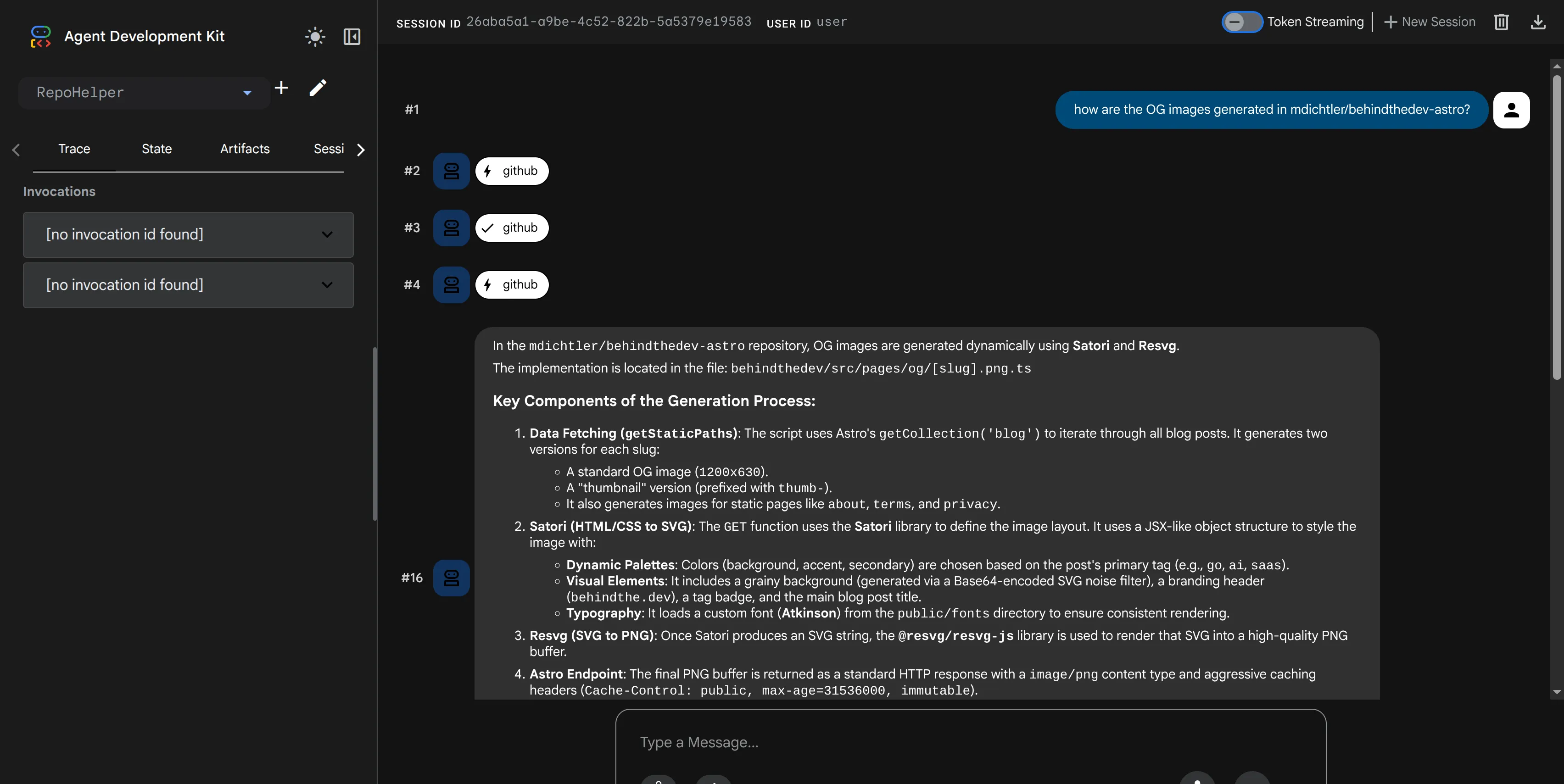
This project is not going to be solely covered in this post, rather over the period of next 3 months it will continue to evolve, and eventually be open sourced.
For now you will learn to:
- Create your very first agent with the ADK
- Create your very first custom tool (to list, and read files from Github API!)
- Put it together, run the ADK’s web interface and ask about one of your private repos!
Boilerplate & project setup
I’m building my agent with Go (my all time favorite language!) that being said, there is official SDKs for Java, Typescript as well as Python so whatever works best for you. The code is heavily abstracted by the ADK - that means regardless of the language you should be able to follow the guide, some things like commands might slightly differ. I recommend referring to the official docs for platform specific commands.
See official tutorials: https://adk.dev/tutorials/
- Create new folder for your agent,
go mod init user/repofollowed bygo mod tidyto install packages. - Create
agent.goand enter the boilerplate code to init our base agent
package main

import (
	"context"
	"log"
	"os"
	"google.golang.org/adk/agent"
	"google.golang.org/adk/agent/llmagent"
	"google.golang.org/adk/cmd/launcher"
	"google.golang.org/adk/cmd/launcher/full"
	"google.golang.org/adk/model/gemini"
	"google.golang.org/adk/tool"
	"google.golang.org/adk/tool/geminitool"
	"google.golang.org/genai"
)

func main() {
	ctx := context.Background()

	model, err := gemini.NewModel(ctx, "gemini-flash-latest", &genai.ClientConfig{
		APIKey: os.Getenv("GEMINI_API_KEY"),
	})
	if err != nil {
		log.Fatalf("Failed to create model: %v", err)
	}

	t := true
	repoHelperAgent, err := llmagent.New(llmagent.Config{
		Name:  "RepoHelper",
		Model: model,
		GenerateContentConfig: &genai.GenerateContentConfig{
			ToolConfig: &genai.ToolConfig{
				IncludeServerSideToolInvocations: &t,
			},
		},
		Description: "A developer helper tool that answers questions about codebases or generic programming concepts.",
		Instruction: `
		You are an expert developer assistant. Your purpose is to interact with codebases and answer questions about them.
		You have access to aGoogle Search tool.

		- If a user's question is generic, asks about general programming concepts, or cannot be answered purely from the codebase, use the Google Search tool.

		Determine which tool to use based on the nature of the user's question.
		`,
		Tools: []tool.Tool{
			geminitool.GoogleSearch{},
		},
	})
	if err != nil {
		log.Fatalf("Failed to create agent: %v", err)
	}

	config := &launcher.Config{
		AgentLoader: agent.NewSingleLoader(repoHelperAgent),
	}

	l := full.NewLauncher()
	if err = l.Execute(ctx, config, os.Args[1:]); err != nil {
		log.Fatalf("Run failed: %v\n\n%s", err, l.CommandLineSyntax())
	}
}
- Get API key from https://aistudio.google.com and export it as variable
export GEMINI_API_KEY="YOUR_KEY" - Run the local services, first cd into the folder you created and then run:
go run agent.go web api webui
At this point you should be able to interact with the agent, follow the link in your terminal to access the web GUI and test out the agent can answer generic question baselined on Google Search (notice the Google Search tool doesn’t require any code!).
You can ask something along the lines of “What is the latest version released for astrojs” or similar
Great! Now that we have the agent working, let’s create a simple Github tool to retrieve contents of our repo!
Creating custom tools - Github API
Tool definition is also rather simple, as I’ve mentioned earlier we are flipping the script and fully defining this behavior, so it’s just like if you were implementing handler for the Github API with some caveats of relying on ADK’s abstraction.
package main

import (
	"encoding/base64"
	"encoding/json"
	"fmt"
	"io"
	"net/http"
	"os"
	"strings"

	"google.golang.org/adk/tool"
	"google.golang.org/adk/tool/functiontool"
)

// GitHubToolInput specifies the parameters for the GitHub tool.
type GitHubToolInput struct {
	Action string `json:"action" jsonschema:"The action to perform: 'list' to list files in a directory, or 'read' to read file contents."`
	Owner  string `json:"owner" jsonschema:"The owner of the GitHub repository."`
	Repo   string `json:"repo" jsonschema:"The name of the GitHub repository."`
	Path   string `json:"path" jsonschema:"The path to the file or directory in the repository. Use an empty string or '/' for the root directory."`
	Branch string `json:"branch,omitempty" jsonschema:"The branch to read from. Defaults to the repository's default branch if left empty."`
}

// GitHubToolOutput holds the results from the GitHub tool.
type GitHubToolOutput struct {
	Content string   `json:"content,omitempty"`
	Files   []string `json:"files,omitempty"`
}

func githubToolHandler(ctx tool.Context, input GitHubToolInput) (*GitHubToolOutput, error) {
  // To avoid this being super long, you can get the code from Gist:
  // https://gist.github.com/mdichtler/edf112e4f956e392f306a4f6918170fa
}

// NewGitHubTool creates a new GitHub tool.
func NewGitHubTool() (tool.Tool, error) {
	return functiontool.New(functiontool.Config{
		Name:        "github",
		Description: "Interact with GitHub repository files. Provide an owner, repo, and action. The tool can 'list' files in a directory or 'read' contents of a file.",
	}, githubToolHandler)
}
The most important parts to notice is the strict typing around inputs and outputs, as well as the jsonschema definition to be consumed by the LLM.
To plug it in to our existing code in our agent.go we will simply
// ... previous content
// initiate the new Github tool
githubTool, err := NewGitHubTool()
if err != nil {
    log.Fatalf("Failed to create github tool: %v", err)
}

t := true
	repoHelperAgent, err := llmagent.New(llmagent.Config{
		Name:  "RepoHelper",
		Model: model,
		GenerateContentConfig: &genai.GenerateContentConfig{
			ToolConfig: &genai.ToolConfig{
				IncludeServerSideToolInvocations: &t,
			},
		},
		Description: "A developer helper tool that answers questions about codebases or generic programming concepts.",
		// Update instructions to mention the tool and when to use it
        Instruction: `
		You are an expert developer assistant. Your purpose is to interact with codebases and answer questions about them.
		You have access to a GitHub tool to read repositories and a Google Search tool.

		- If a user's question is specific to a codebase, use the GitHub tool to navigate the repository, list files, and read file contents to find the answer.
		- If a user's question is generic, asks about general programming concepts, or cannot be answered purely from the codebase, use the Google Search tool.

		Determine which tool to use based on the nature of the user's question.
		`,
		Tools: []tool.Tool{
			geminitool.GoogleSearch{},
            // add it to the list of tools
            githubTool,
		},
	})

// ... continuing agent.go
Now the last thing we need to do before this is ready to be tested is to setup access to Github API. By far the easiest way is to use PAT (personal access token).
- Create your PAT token: https://github.com/settings/personal-access-tokens/new
- Select only specific repository (if you leak the token, minimize damage!)
- Make sure you are using fine grained permissions, and grant the token
Contents - read-onlypermission exclusively (some like metadata might be preselected, this is ok!) - You should now have your token, copy it, don’t save it
Similarly to how we have exported the variable for GEMINI_API_KEY we will now export GITHUB_PAT (the variable name definition is in the Github tool).
export GITHUB_PAT="YOUR_GITHUB_TOKEN"
After the token has been exported you should be ready to go! Terminate your previous session of the agent and run go run . web api webui
The services should have restarted and will be ready to go, navigate to the agent, give it name of the repository, your username (this needs to be mentioned explicitly, you’ll find out why we did this later!) and ask away!
You now should know how to create the most basic agent, as well as custom tools, this gets you about 60% there, there is lot more stuff we are going to deep dive into in future posts, follow me on Medium to get update whenever the next post is out - covering how to deploy your agent to Firebase!
Disclaimer: This article is based on my personal experiences and research. The opinions expressed here are solely my own and do not represent those of my employer, or its affiliates.