Drive SaaS Customers with a 100/100 Performance Blog
If you are a technical founder, it is pretty likely that you are having fun building the product. If you are not building your first SaaS however, you probably reached the stage of product launched, and now what? Technical founders (myself included) absolutely dread marketing and sales, this post is about how I avoided cold outreach, running ads and was driving traffic to my SaaS by building a high performance blog.
To keep this reasonably short, this will be more of an overview with some tips and tricks along the way. If you do have any questions, leave a comment on Medium or feel free to reach out on X!
Performance & Analytics
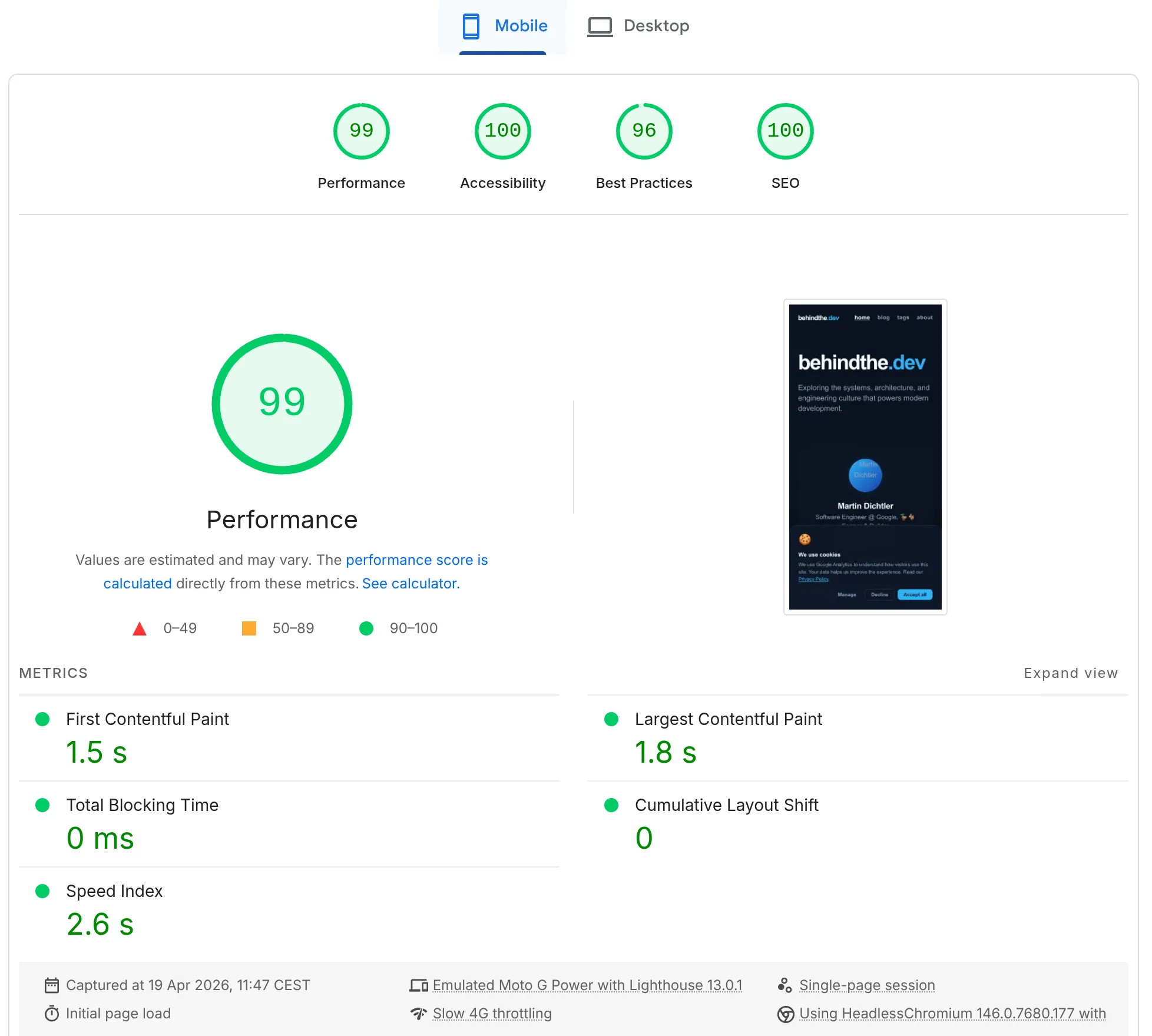
Before we get to how, I want to show you the outcomes. Above you can see the performance measured at the time of writing this post on mobile device. Is it perfect 400 score? No. But close enough and that’s what you should aim for. Reasonable amount of effort for most of the outcome. Can you hyperoptimize to reach the perfect score? Absolutely. Will it be worth it? Most definitely not.
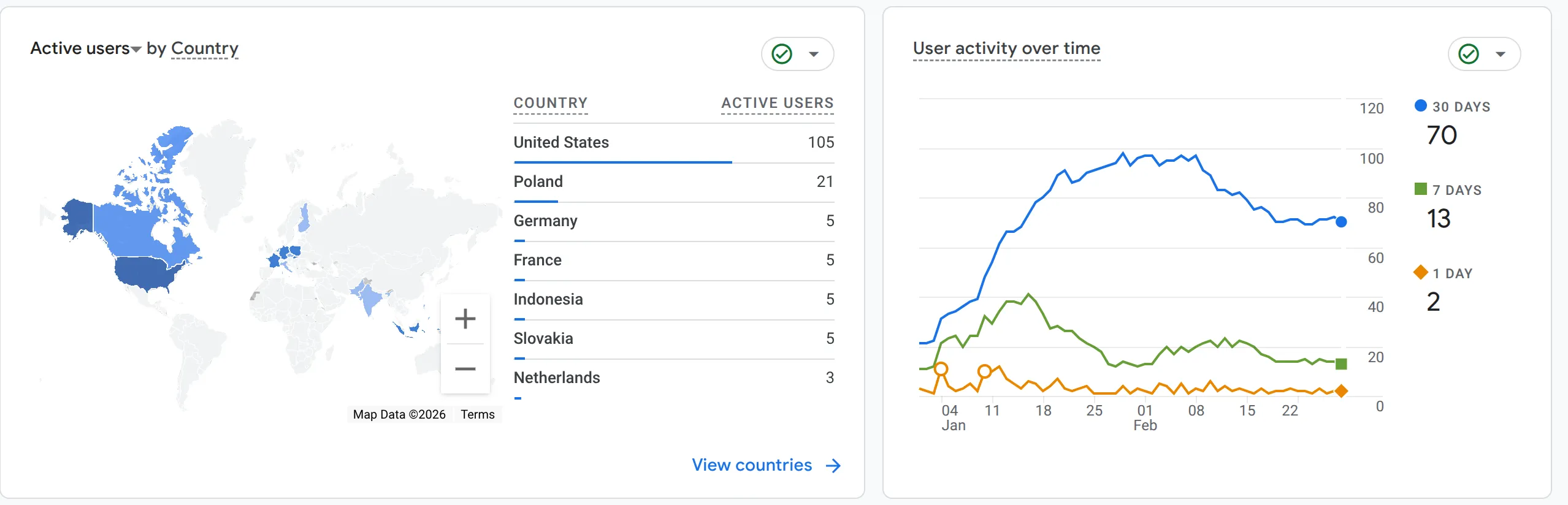
Once again, what was very similar setup for one of my startups, in its first 2 months since release. The traffic isn’t insane, but its purely organic, no advertising, no cold outreach, no link sharing at all, driven by the website and the blog alone.
Shifting your mindset
We are going to be using markdown. For me, few years back this was a deal breaker. I didn’t have problem with markdown itself, but I wanted a fancy editor, real time deployment of new content, scheduling etc.. By the time we reach the end, I’m sure if you have similar concerns, they will all be addressed or at least that this will give you a good perspective of what can be achieved.
Why markdown?
I’m not 100% sure where I’ve seen it, but at some point heard someone say that performance is tradeoff for complexity. Less complex applications will almost always be more performant, not necessarily because of the complexity itself, but because of the maintenance required.
The idea of using markdown for your blog is simple:
-
minimal maintenance on performance optimization (statically generated pages)
-
optimize images at build time
-
full control & customization
-
work offline with a fancy editor
Make markdown suck less with powerful & free editor like MarkText - offline first, use git as version control, works great with our setup! (this post was written in MarkText as well!)
The Blueprint
To get you started, you will create a brand new astro.build project - specifically utilizing their blog template.
npm create astro@latest -- --template blogThis should get you the necessary setup, mobile optimized, 100/100 static blog. In all fairness, if you don’t mind bit of extra work with publishing, this could be enough, simply customize it to fit your brand and you are done with the setup.
That being said, if you are like me, you are not afraid to commit more time initially to save lot of time long term, so to build on top of this setup:
-
Create Dynamic Image Endpoint (generate thumbnails & OG images) - you can use the one I use: behindthe.dev - Dynamic Image Endpoint · GitHub
-
Add RSS feed support
// pages/rss.xml.js
import { getCollection } from 'astro:content';
import rss from '@astrojs/rss';
import { SITE_DESCRIPTION, SITE_TITLE } from '../consts';

export async function GET(context) {
	const posts = await getCollection('blog');
	return rss({
		title: SITE_TITLE,
		description: SITE_DESCRIPTION,
		site: context.site,
		items: posts.map((post) => ({
			...post.data,
			link: `/blog/${post.id}`,
		})),
	});
}
- If you are using tags like me for your posts, you might want to have a way for tags to act like categories and summarize content
// pages/tags/[tag].astro
---
import { getCollection } from 'astro:content';
import BaseHead from '../../components/BaseHead.astro';
import Header from '../../components/Header.astro';
import Footer from '../../components/Footer.astro';
import PostCard from '../../components/PostCard.astro';
import { SITE_TITLE } from '../../consts';

export async function getStaticPaths() {
	const posts = await getCollection('blog');
	const tags = [...new Set(posts.map((post) => post.data.tags || []).flat())];

	return tags.map((tag) => {
		const filteredPosts = posts.filter((post) => post.data.tags?.includes(tag))
            .sort((a, b) => b.data.pubDate.valueOf() - a.data.pubDate.valueOf());
		return {
			params: { tag: tag.toLowerCase() },
			props: { tag, posts: filteredPosts },
		};
	});
}

const { tag, posts } = Astro.props;
---

<!doctype html>
<html lang="en">
	<head>
		<BaseHead
            title={`Posts tagged with "${tag}" | ${SITE_TITLE}`}
            description={`Browse all posts tagged with ${tag} on ${SITE_TITLE}`}
        />
		<style>
			main {
				width: 100%;
				max-width: 800px;
				margin: 0 auto;
				padding: 0 1.5rem;
			}
			.tag-header {
				padding: 4rem 0 2rem 0;
				border-bottom: 1px solid rgba(255, 255, 255, 0.05);
				margin-bottom: 4rem;
			}
			.tag-header h1 {
				font-size: 3.5rem;
				margin: 0;
				letter-spacing: -0.04em;
			}
			.tag-header .accent {
				color: var(--accent);
			}
			.posts-grid {
				display: flex;
				flex-direction: column;
				gap: 4rem;
				padding-bottom: 4rem;
			}
		</style>
	</head>
	<body>
		<Header />
		<main>
			<div class="tag-header">
				<h1>posts tagged <span class="accent">#{tag}</span></h1>
			</div>
			<div class="posts-grid">
				{
					posts.map((post) => (
						<PostCard post={post} />
					))
				}
			</div>
		</main>
		<Footer />
	</body>
</html>
- Add sitemap
// @ts-check

import mdx from '@astrojs/mdx';
import sitemap from '@astrojs/sitemap';
import { defineConfig } from 'astro/config';

// https://astro.build/config
export default defineConfig({
	site: 'https://behindthe.dev',
	trailingSlash: 'never',
	integrations: [mdx(), sitemap()],
	markdown: {
		shikiConfig: {
			theme: 'github-dark',
			wrap: true,
		},
	},
	redirects: {
		// optionally add redirects here if you are migrating from existing blog if needed
	},
	build: {
		inlineStylesheets: 'always',
	},
});
-
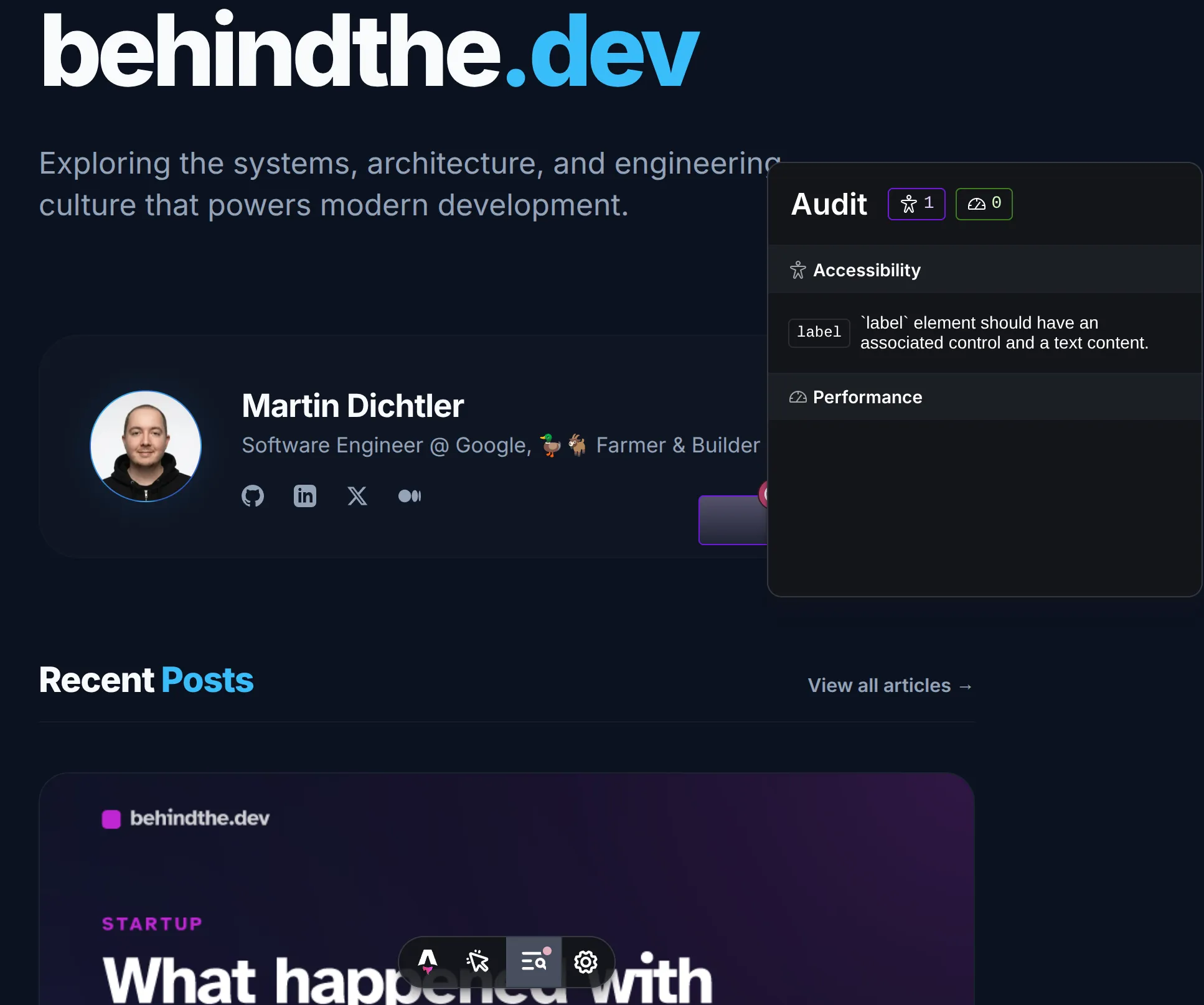
Pro tip: leverage the Astro’s audit tool to optimize for accessibility (run in dev mode, bottom toolbar in browser will show “Audit”) - helps you catch missing alt tags, poor color contrast which helps your page experience!
Integrate into your SaaS
Given the chance that your SaaS isn’t built on top of Astro you will probably need to find clever way to integrate it seamlessly with your primary website. You might be thinking initially to use blog.yourwebsite.com but this would actually be a mistake. Subdomains are popular for multi tenant content sites as they do carry their own domain authority.
While your content will keep on ranking in search, the domain authority built from backlinks to your posts and the content itself will not carry over to boosting presence of your top level domain.
To address this you should instead set base route of your Astro blog to /blog or whatever you prefer and subsequently created a remap for that route, either in your application directly (less preferred) or optimally with your hosting provider, you can use the below snippet for Vercel or Netlify.
{
  "rewrites": [
    { "source": "/blog/:path*", "destination": "https://your-blog-deployment.com/blog/:path*" }
  ]
}
Content is king - but let’s not forget about LLMs
First months are rough. You will be sandboxed by Google Search initially, meaning your first months of traffic (especially on brand new domain) will be low. To maximize your reach, ensure that you submit your content to both Google Search Console as well as Bing Webmasters - why Bing? ChatGPT uses it to source its data so you might be able get few clicks from LLMs directly while you prove your content quality and reputation.
Keep your writing original and value first. While many will tell you your content should be long, which generally helps what will matter even more is the quality of your content, click rate and read rate.
Finally, start building backlinks as soon as possible - while most places where you can publish your content will not give you “dofollow” link, they help you to increase their exposure with their own audience. For example if your startup is developer focused, you might be able to publish to dev.to, medium.com, reddit, X and more to increase your discoverability. This might lead to someone eventually quoting you and giving you the dofollow backlink.
Further customization
The blog is your own, nothing stops you to add additional logic that runs with your builds, such as running your content through LLM for spell checking, leveraging various 3rd party APIs for SEO validation. Think of this as the base of a blog that works. Iterate on it as you see fit.
Consider also adding llms.txt as a way for LLMs to browse your website more efficiently instead of strictly relying on search. (both blog and SaaS!)
Disclaimer: This article is based on my personal experiences and research. The opinions expressed here are solely my own and do not represent those of my employer, or its affiliates.